
Dataset Generators
Dataset Generators provide a modular, declarative way to create synthetic datasets in AI GO!.
They follow the same declarative principles as declarative tasks, but instead of producing evaluation results, they generate datasets using building blocks: Data Sources and Synthesizers.
Quick Links
Concepts
Dataset generation is a two-step process consisting of a data source and a synthesizer.
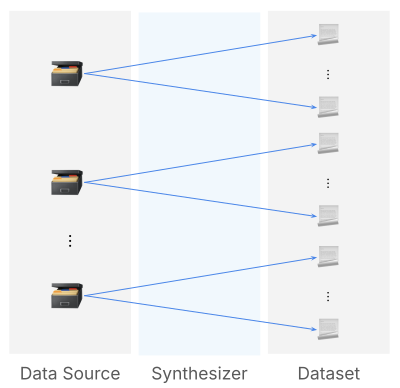
Data Source
The data source determines what the synthesizer should work on. It produces data source samples, which then act as input to the synthesizer, which will synthesize one or multiple dataset samples from the data source sample.
A data source sample may be:
- One or multiple dataset rows
- One or multiple documents
- Nothing (for synthesizers that generate samples "from scratch")
Synthesizer
The synthesizer takes a data source sample and produces one or more dataset samples. The set of all synthesized samples (over all data source samples) then form the generated dataset.
A synthesizer may be:
- LLM synthesizer: uses an LLM to generate samples
- Template synthesizer: interpolates a Jinja template to generate samples
Usage
Commands
- Define the dataset generator in a YAML file
dataset_generator.yaml.
key: "<dataset_generator_key>"
display_name: "<dataset_generator_display_name>"
description: "<dataset_generator_description>"
config_spec:
  # List of configurable parameters that need to be provided in a dataset generation request.
  - key: "<config_parameter_key>"
    type: "<config_parameter_type>"
    display_name: "<config_parameter_display_name>"
  ...
definition:
  type: "declarative_dataset_generator"
  data_source:
    type: "<data_source_type>"
    # Additional properties required to configure the dataset source.
    ...
  synthesizer:
    type: "<synthesizer_type>"
    # Additional properties required to configure the synthesizer.
...- Create the dataset generator as defined in
dataset_generator.yaml. This will persist the dataset generator in AI GO!.
- If there is no dataset generator with the key provided in the YAML file, a new dataset generator is created.
- If a dataset generator with the key provided in the YAML file already exists, the dataset generator is updated if the data has changed.
lf dataset-generator add -f 'dataset_generator.yaml'- List all dataset generators.
lf dataset-generators- Generate a dataset using the created dataset generator.
key: "<dataset-key>"
display_name: "<dataset-display-name>"
generator_specification:
  dataset_generator_key: "<dataset_generator_key>"
  num_samples: 10
  dataset_generator_config:
...lf dataset add -f dataset.yaml- Delete the dataset generator by key.
lf dataset-generator delete '<dataset_generator_key>'Example
Jinja Synthesizer
Definitions
{"name": "Alice Morgan", "product": "Premium Cloud Storage"}
{"name": "Brian Turner", "product": "Wireless Earbuds Pro"}
{"name": "Carla Schneider", "product": "SmartHome Thermostat"}
{"name": "Daniel Reyes", "product": "UltraHD Streaming Subscription"}
{"name": "Elena Kraus", "product": "Electric Scooter Model X"}
{"name": "Felix Gruber", "product": "AI Writing Assistant App"}
{"name": "Gina Patel", "product": "Fitness Tracker Band 4"}
{"name": "Hannah Lopez", "product": "Online Photo Backup Service"}
{"name": "Ivan Dimitrov", "product": "Noise-Cancelling Headset"}
{"name": "Julia Weber", "product": "Portable Solar Charger"}
key: "customer-names-products"
display_name: "Customer Names and Products"
file_path: "seed_dataset.jsonl"key: "customer-support-tickets"
display_name: "Customer Support Tickets"
description: "A dataset generator that produces synthetic customer support messages."
config_spec: []
definition:
type: "declarative_dataset_generator"
data_source:
type: "dataset_samples"
dataset_key: "customer-names-products"
synthesizer:
type: "template"
template: >
{greeting}, my name is {{ source.name }}.
I'm having an issue with {{ source.product }}.
Can you help me with this?
Thanks
fields:
greeting:
- "Hello"
- "Good morning"key: "customer-support-tickets"
display_name: "Customer Support Tickets"
generator_specification:
dataset_generator_key: "customer-support-tickets"
num_samples: 10
dataset_generator_config: {}Run the following set of CLI commands to create the model and dataset generator.
lf dataset add -f seed_dataset.yaml
lf dataset-generator add -f dataset_generator.yaml
lf dataset add -f dataset.yaml
This will start the dataset generation process.
Finally, you can export the dataset and inspect the generated samples:
$ lf dataset export 'customer-support-tickets'
                                    Dataset samples preview (10 rows)
┏━━━━━━━━━━━━━━━━━┳━━━━━━━━━━━━━━━━━━━━━━━━━━━━━━━━┳━━━━━━━━━━━━━━━━━━━━━━━━━━━━━━━━━━━━━━━━━━━━━━━━━━━━━┓
┃ name            ┃ product                        ┃ synthesized_text                                    ┃
┡━━━━━━━━━━━━━━━━━╇━━━━━━━━━━━━━━━━━━━━━━━━━━━━━━━━╇━━━━━━━━━━━━━━━━━━━━━━━━━━━━━━━━━━━━━━━━━━━━━━━━━━━━━┩
│ Alice Morgan    │ Premium Cloud Storage          │ Hello, my name is Alice Morgan.                     │
│                 │                                │ I'm having an issue with Premium Cloud Storage.     │
│                 │                                │ Can you help me with this?                          │
│                 │                                │ Thanks                                              │
│ Alice Morgan    │ Premium Cloud Storage          │ Good morning, my name is Alice Morgan.              │
│                 │                                │ I'm having an issue with Premium Cloud Storage.     │
│                 │                                │ Can you help me with this?                          │
│                 │                                │ Thanks                                              │
│ Brian Turner    │ Wireless Earbuds Pro           │ Good morning, my name is Brian Turner.              │
│                 │                                │ I'm having an issue with Wireless Earbuds Pro.      │
│                 │                                │ Can you help me with this?                          │
│                 │                                │ Thanks                                              │
│ Brian Turner    │ Wireless Earbuds Pro           │ Hello, my name is Brian Turner.                     │
│                 │                                │ I'm having an issue with Wireless Earbuds Pro.      │
│                 │                                │ Can you help me with this?                          │
│                 │                                │ Thanks                                              │
│ Carla Schneider │ SmartHome Thermostat           │ Good morning, my name is Carla Schneider.           │
│                 │                                │ I'm having an issue with SmartHome Thermostat.      │
│                 │                                │ Can you help me with this?                          │
│                 │                                │ Thanks                                              │
│ Carla Schneider │ SmartHome Thermostat           │ Hello, my name is Carla Schneider.                  │
│                 │                                │ I'm having an issue with SmartHome Thermostat.      │
│                 │                                │ Can you help me with this?                          │
│                 │                                │ Thanks                                              │
│ Daniel Reyes    │ UltraHD Streaming Subscription │ Good morning, my name is Daniel Reyes.              │
│                 │                                │ I'm having an issue with UltraHD Streaming          │
│                 │                                │ Subscription.                                       │
│                 │                                │ Can you help me with this?                          │
│                 │                                │ Thanks                                              │
│ Daniel Reyes    │ UltraHD Streaming Subscription │ Hello, my name is Daniel Reyes.                     │
│                 │                                │ I'm having an issue with UltraHD Streaming          │
│                 │                                │ Subscription.                                       │
│                 │                                │ Can you help me with this?                          │
│                 │                                │ Thanks                                              │
│ Elena Kraus     │ Electric Scooter Model X       │ Good morning, my name is Elena Kraus.               │
│                 │                                │ I'm having an issue with Electric Scooter Model X.  │
│                 │                                │ Can you help me with this?                          │
│                 │                                │ Thanks                                              │
│ Elena Kraus     │ Electric Scooter Model X       │ Hello, my name is Elena Kraus.                      │
│                 │                                │ I'm having an issue with Electric Scooter Model X.  │
│                 │                                │ Can you help me with this?                          │
│                 │                                │ Thanks                                              │
└─────────────────┴────────────────────────────────┴─────────────────────────────────────────────────────┘
{
  "key": "customer-support-tickets",
  "display_name": "Customer Support Tickets",
  "generator_specification": {
    "dataset_generator_config": {},
    "num_samples": 10,
    "dataset_generator_key": "customer-support-tickets"
  }
}
LLM Synthesizer
Definitions
key: "spelling-mistakes"
display_name: "Spelling Mistakes"
description: "A dataset generator for introducing spelling mistakes into questions."
config_spec: []
definition:
  type: "declarative_dataset_generator"
  data_source:
    type: "dataset_samples"
    dataset_key: "latticeflow$mmlu-test"
  synthesizer:
    type: "llm"
    model_key: "openai-gpt-4-1-nano-2025-04-14"
    system_prompt_template: "You are a helpful dataset generator."
    user_prompt_template: >
      Generate a set of different version of the following question, by introducing
      various types of spelling mistakes.

      <question>
      {{ source.question }}
      </question>
    sample_properties:
      question:
type: stringdisplay_name: "OpenAI GPT-4.1 Nano"
key: "openai-gpt-4-1-nano-2025-04-14"
description: "OpenAI GPT-4.1 Nano."
rate_limit: 100
modality: "text"
task: "chat_completion"
adapter:
key: "latticeflow$openai"
config:
connection_type: "custom_connection"
url: "https://api.openai.com/v1/chat/completions"
api_key: $OPENAI_API_KEY
model_key: "gpt-4.1-nano-2025-04-14"key: "mmlu-test-spelling-mistakes"
display_name: "MMLU: Spelling Mistakes"
description: "MMLU test set with spelling mistakes introduced into questions."
generator_specification:
dataset_generator_key: "spelling-mistakes"
num_samples: 10
dataset_generator_config: {}Run the following set of CLI commands to create the model and dataset generator.
lf model add -f model.yaml
lf dataset-generator add -f dataset_generator.yaml
lf dataset add -f dataset.yaml
This will start the dataset generation process.
Finally, you can export the dataset and inspect the generated samples:
NOTE: Please wait a bit before exporting the dataset, to allow for the dataset generation to finish.
$ lf dataset export 'mmlu-test-spelling-mistakes'
                                                   Dataset samples preview (10 rows)
┏━━━━━━━━━━━━━━━━━━━━━━━━━━━━━━━━━━━━━━━━━━━━━━━━━━━━━━━━━━━━━━━━━━━━━━━━━━━━━━━┳━━━━━━━━━━━━━━━━━━┳━━━━━━━━━━━━━━━━━━━━━━━━━┳━━━━━━━━┓
┃ question                                                                      ┃ subject          ┃ choices                 ┃ answer ┃
┡━━━━━━━━━━━━━━━━━━━━━━━━━━━━━━━━━━━━━━━━━━━━━━━━━━━━━━━━━━━━━━━━━━━━━━━━━━━━━━━╇━━━━━━━━━━━━━━━━━━╇━━━━━━━━━━━━━━━━━━━━━━━━━╇━━━━━━━━┩
│ Find the degree for the given fiel extention Q(sqrt(2), sqrt(3), sqrt(18))    │ abstract_algebra │ ['0', '4', '2', '6']    │ 1      │
│ over Q.                                                                       │                  │                         │        │
│ Find the degre for the given field extension Q(sqrt(2), sqrt(3), sqrt(18))    │ abstract_algebra │ ['0', '4', '2', '6']    │ 1      │
│ ovre Q.                                                                       │                  │                         │        │
│ Find the degree for thje given field extention Q(sqrt(2), sqrt(3), sqrt(18))  │ abstract_algebra │ ['0', '4', '2', '6']    │ 1      │
│ over Q.                                                                       │                  │                         │        │
│ Find the degrree for the given field extension Q(sqrt(2), sqrt(3), sqrt(18))  │ abstract_algebra │ ['0', '4', '2', '6']    │ 1      │
│ oevr Q.                                                                       │                  │                         │        │
│ FInd the degree for the given fiel extension Q(sqrt(2), sqrt(3), sqrt(18))    │ abstract_algebra │ ['0', '4', '2', '6']    │ 1      │
│ over Q.                                                                       │                  │                         │        │
│ Let p = (1, 2, 5, 4)(2, 3) in S_5 . Find the index of <p> in S_5.             │ abstract_algebra │ ['8', '2', '24', '120'] │ 2      │
│ Let p = (1, 2, 5, 4)(2, 3) in S_5 . Find the index of <p> in S_5.             │ abstract_algebra │ ['8', '2', '24', '120'] │ 2      │
│ Let p = (1, 2, 5, 4)(2, 3) in S_5. Find the index of <p> in S_5!              │ abstract_algebra │ ['8', '2', '24', '120'] │ 2      │
│ Let p = (1, 2, 5, 4)(2, 3) in S_5 . Find th index of <p> in S_5.              │ abstract_algebra │ ['8', '2', '24', '120'] │ 2      │
│ Let p = (1, 2, 5, 4)(2, 3) in S_5 . Find the indx of <p> in S_5.              │ abstract_algebra │ ['8', '2', '24', '120'] │ 2      │
└───────────────────────────────────────────────────────────────────────────────┴──────────────────┴─────────────────────────┴────────┘
{
  "key": "mmlu-test-spelling-mistakes",
  "display_name": "MMLU: Spelling Mistakes",
  "description": "MMLU test set with spelling mistakes introduced into questions.",
  "generator_specification": {
    "dataset_generator_config": {},
    "num_samples": 10,
    "dataset_generator_key": "spelling-mistakes"
  }
}